System Requirements
Cortex is a lightweight application. Its system requirements are mainly driven by the size of your database - the larger the database, the more powerful your SQL Server and application server should be.
Deployment Overview
A typical Cortex deployment consists of three layers: an application server running Cortex on IIS, one or more SQL Server instances holding your data, and an authentication service for user login.
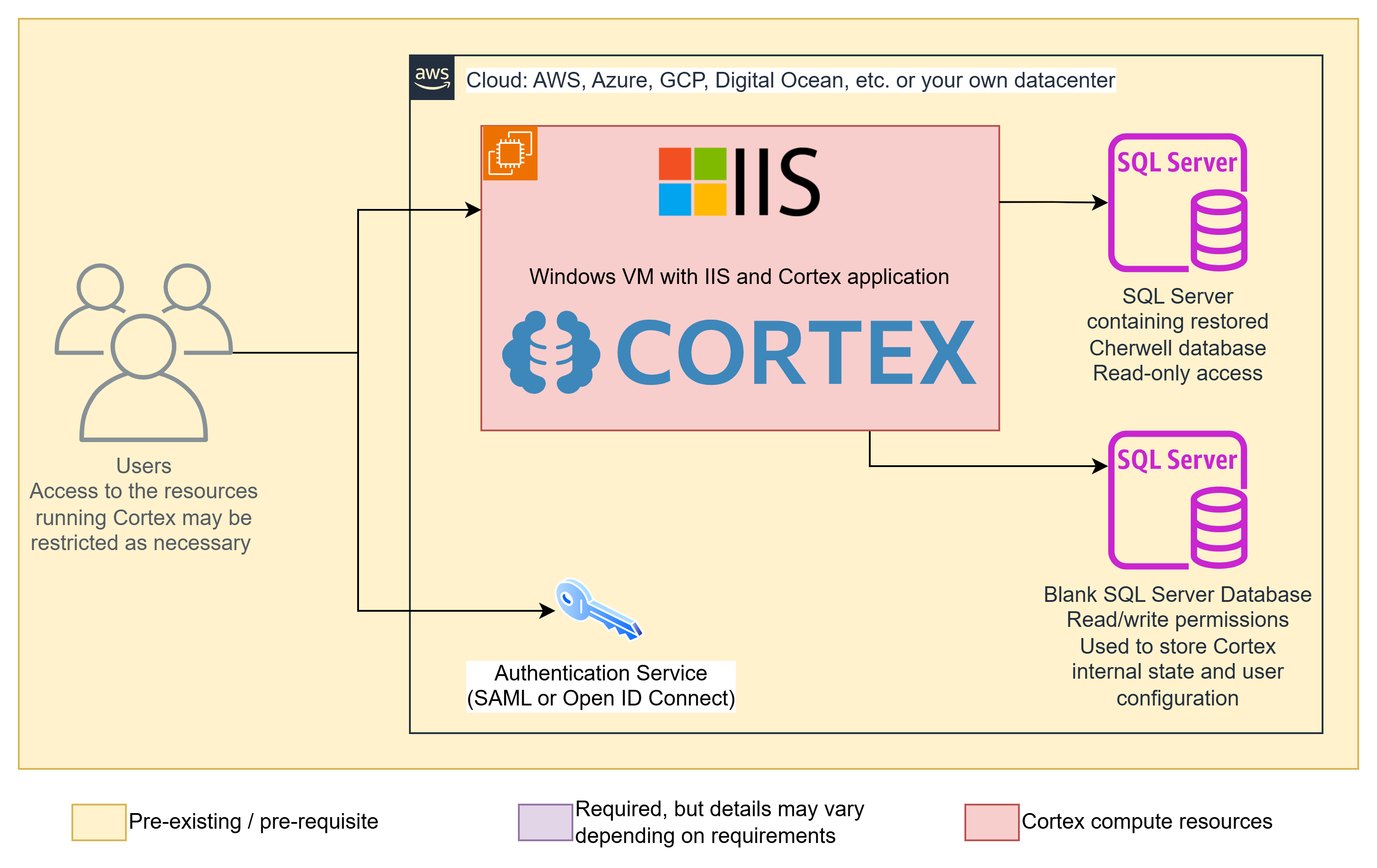
Application server - A Windows VM running IIS with the Cortex application installed. This can be hosted anywhere: AWS, Azure, GCP, Digital Ocean, your own datacenter, or any other environment that can run Windows Server. User access to the VM itself can be restricted as needed.
SQL Server (archive data) - Contains the restored database from your source system (such as Cherwell). Cortex connects to this with read-only credentials and never writes to it.
SQL Server (Cortex database) - A separate blank SQL Server database used to store Cortex's internal state and user configuration. Cortex requires read/write access to this database. This can be on the same SQL Server instance as your archive data or a separate one.
Authentication service - Cortex supports SAML and OpenID Connect for user login. Your existing identity provider (such as Azure AD / Entra ID, Okta, ADFS, or Google Workspace) handles authentication. See Authentication for supported options.
SQL Server
Supported versions: SQL Server 2016, 2017, 2019, 2022, and 2025.
We test against the versions listed above. As new SQL Server versions are released and verified, we add them to this list - if you are planning to use a version not listed here, check with us first.
- Use the same version of SQL Server your source database was running on. If you are unsure, SQL Server 2022 is a safe default.
- Follow SQL Server's recommended specs for memory and CPU based on your database size.
- Ensure there is enough disk space for the OS, SQL Server, and your full database.
- Full-Text Search must be enabled during SQL Server installation.
- Both SQL Server authentication and Windows authentication are supported.
- The archive (source) database connection requires read-only access only. See SQL Server Security Setup for recommended configurations.
Sizing and Availability
- The Cortex database is small — typically well under 1 GB. It stores only Cortex's own configuration and settings.
- The archive database is separate and much larger — it holds your source system's data (Cherwell, ServiceNow, ManageEngine, etc.). It is normally the customer's existing SQL Server hosting that data, or a restored copy of it. Size your SQL Server hardware around the archive database, not the Cortex database.
- Cortex keeps two independent connections: a read/write connection to the Cortex database and a read-only connection to each archive database. See How Cortex Archives Work.
- High availability — the archive database(s) may reside in a SQL Server high-availability cluster (for example a failover cluster instance or an Always On availability group); this is supported.
- Failover behavior — during a database failover, Cortex does not automatically retry every failed connection attempt. Users may see a brief error on screen if a query times out or fails; refreshing the page re-establishes the connection.
Application Server
- Windows Server 2019 or later
- Minimum 4 GB RAM and 2 CPUs (increase based on load and database size)
- IIS with WebSockets support enabled
- No .NET runtime installation required - it is bundled with Cortex
Clients
- All modern browsers on all modern operating systems are supported.
- Cortex is not mobile-optimized but does function on mobile devices.
Next step
Continue to: Install