System Requirements
Cortex is a very efficient application, so its system requirements are primarily driven by the size and complexity of your database. The larger your database, the more powerful the SQL Server and application server should be.
Deployment Overview
A typical Cortex deployment consists of three layers: an application server running Cortex on IIS, one or more SQL Server instances holding your data, and an authentication service for user login.
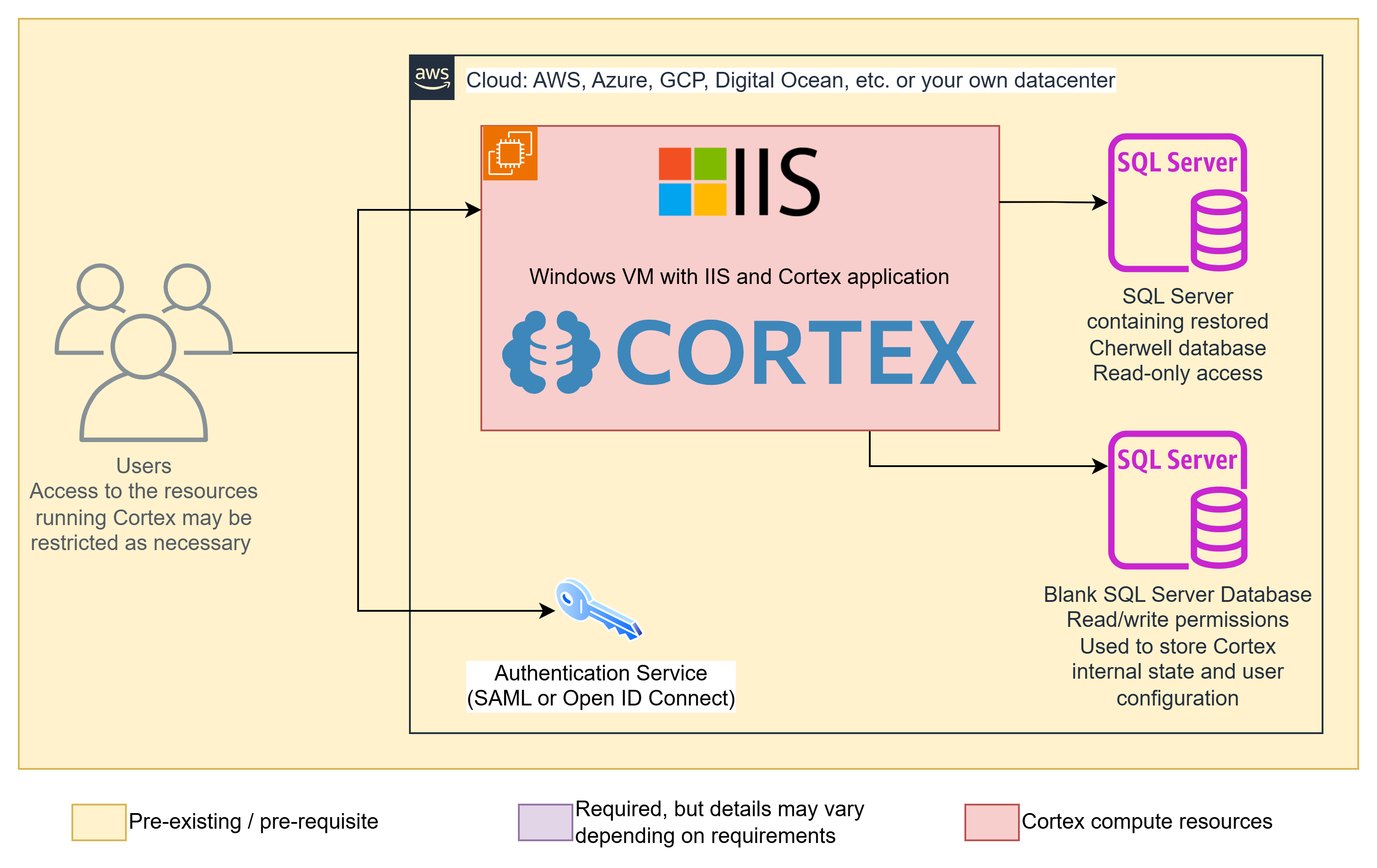
Application server - A Windows VM running IIS with the Cortex application installed. This can be hosted anywhere: AWS, Azure, GCP, Digital Ocean, your own datacenter, or any other environment that can run Windows Server. User access to the VM itself can be restricted as needed.
SQL Server (archive data) - Contains the restored database from your source system (such as Cherwell). Cortex connects to this with read-only credentials and never writes to it.
SQL Server (Cortex database) - A separate blank SQL Server database used to store Cortex's internal state and user configuration. Cortex requires read/write access to this database. This can be on the same SQL Server instance as your archive data or a separate one.
Authentication service - Cortex supports SAML and OpenID Connect for user login. Your existing identity provider (such as Azure AD / Entra ID, Okta, ADFS, or Google Workspace) handles authentication. See Authentication for supported options.
SQL Server
- Ideally, use the same version of SQL Server as your Cherwell instance was using. If you don't know what version that was, use SQL Server 2022 (latest) or 2019 (latest minus one).
- Use SQL Server�s recommended system specs for memory and CPU.
- Ensure you provide enough disk space for the OS, SQL Server, and your whole Cherwell database.
- Enable Full-Text Search during SQL Server installation.
- Both SQL Server authentication and Windows authentication are supported.
Application Server
- Windows Server 2019 and later are supported.
- Minimum 4 GB RAM and 2 CPUs (increase based on load and database size).
- IIS with WebSockets support enabled.
- No .NET runtime is required (it is bundled with Cortex).
Clients
- All modern browsers are supported on all modern operating systems.
- Cortex is not mobile-optimized, but can work on mobile devices.
Next step
Continue to: Install