Getting Your Cherwell Data
There are two ways to get a copy of your Cherwell data depending on whether your instance is hosted by Ivanti or self-managed.
Hosted by Ivanti
Ivanti provides this help article which covers the full request process. A few important notes before you start:
- You want a BAK file - the full database backup. This is the most important thing to confirm when making your request.
- These files are large and can arrive corrupted. If anything looks wrong, contact Ivanti support immediately for a fresh copy - do not spend time troubleshooting a potentially corrupt file.
- Ivanti retains backups for 30 days, even after your license expires.
- If you run into delays or difficulties, let us know. We may be able to help route your request to the right people.
Self-hosted
If you manage your own SQL Server, take a standard backup using SQL Server Management Studio (SSMS) or a backup script and provide us with the resulting BAK file.
Exporting a CZAR File
If you need to share your Cherwell schema or lookup table data with us - for example, for support or configuration work - you can export a CZAR file from the Cherwell Admin client.
You can also run the same style of export from the command line using Ivanti’s CLC /exportsystem tool (for scripted or unattended exports). See Export a CZAR from Cherwell via the command line.
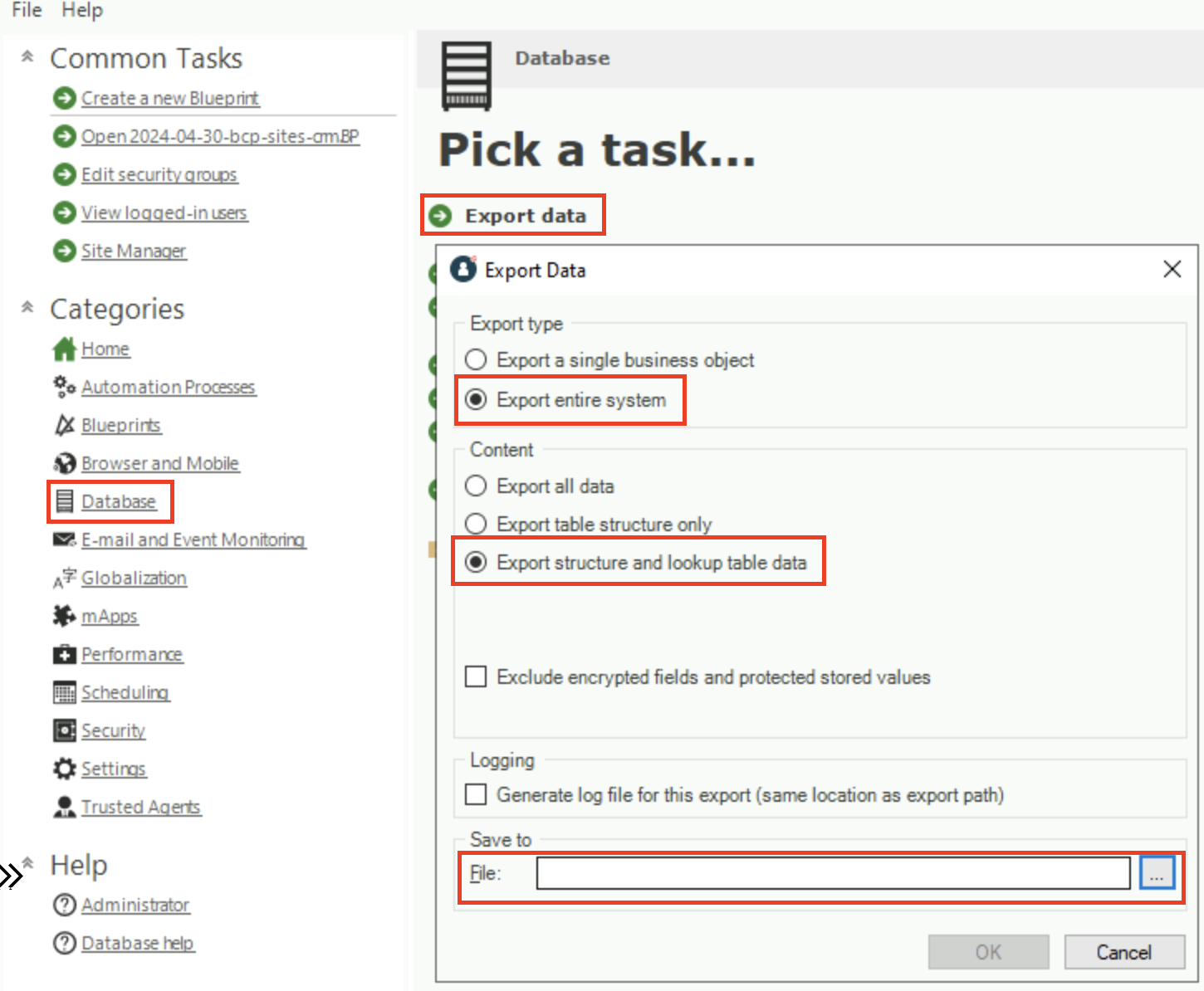
- In the Cherwell Admin client, go to Database settings and choose Export Data.
- Choose Export entire system and Export structure and lookup table data.
If sharing lookup table data is not permitted under your data security policy, Export table structure only is usually sufficient.
- Choose a filename and click OK.
Sending the File
BAK and CZAR files can be large. If it is too big to attach to an email, we can work with a OneDrive or Google Drive link, or we recommend Our Box Drive.