Administration Troubleshooting
This page collects common administration issues and diagnostics for Cortex Archive.
SAML with ADFS
Expand troubleshooting steps
SAML with ADFS troubleshooting
Applies to: Administration -> Authentication -> SAML with ADFS Related guide: SAML Authentication with ADFS
Symptoms and fixes
1) Login fails immediately, or ADFS returns a relying party / identifier error
Most common cause: The Relying Party Trust identifier does not exactly match Cortex Archive's PublicUri.
What to check
- Your Cortex Archive
Authentication:Saml:PublicUri - Your ADFS Relying Party Trust Identifier (Entity ID)
Fix
- In ADFS -> Relying Party Trusts -> (your trust) -> Properties
- Ensure the Identifier is exactly the same as the
PublicUri - Match:
httpsvshttp(should behttps)- Hostname
- Port (if present)
- No trailing slash differences
- Ensure the Identifier is exactly the same as the
2) ADFS authenticates successfully, but Cortex Archive does not log the user in
Most common cause: ADFS is not sending the correct user identifier claim (or Cortex Archive is looking for a different claim).
What to check
- In ADFS, the claim rule should map:
- Active Directory attribute:
SAM-Account-Name - Outgoing claim type:
Name ID
- Active Directory attribute:
Fix
- ADFS -> Relying Party Trusts -> (your trust) -> Edit Claim Issuance Policy
- Add Rule -> Send LDAP Attributes as Claims
- Attribute store: Active Directory
- LDAP Attribute: SAM-Account-Name`
- Outgoing claim type: Name ID
Notes
SAM-Account-Nameis effectively the Windows username.- The outgoing claim type must be Name ID (not Email, UPN, etc.) unless you have intentionally configured Cortex Archive to look up by email (see below).
3) You do not see "Active Directory" in the Attribute Store dropdown
Cause: ADFS services / AD integration isn't available in the current context, or the trust creation flow didn't fully initialize the rule editor.
Fix
- Close and re-open the rule editor and try again.
- Confirm ADFS is properly joined/configured with Active Directory.
- If you have an existing relying party trust where the dropdown works, compare the server role/services and configuration against the environment you're currently editing.
4) ADFS does not know where to send the SAML response (assertion)
Most common cause: The Assertion Consumer Service (ACS) endpoint was not added (or is incorrect).
Fix
- ADFS -> Relying Party Trusts -> (your trust) -> Properties -> Endpoints
- Add SAML Assertion Consumer endpoint
- Binding: POST
- URL:
{PublicUri}/saml-post - Set it as Default
Example: If PublicUri is https://archive.company.com, the endpoint should be https://archive.company.com/saml-post
5) Certificate validation errors (common with self-signed certificates)
Symptoms
- Cortex Archive fails to start authentication flow
- Logs mention certificate chain, validation, or revocation issues
Cause: Self-signed or internal CA certificates often fail strict validation or revocation checks in environments where the chain is not trusted.
Fix options
- Preferred: Use a certificate chain trusted by the Cortex Archive host.
- For dev/test environments only: relax validation settings.
Common settings used in non-production scenarios:
Authentication:Saml:CertificateValidationModeAuthentication:Saml:RevocationMode
If you relax these settings for testing, restore strict validation before moving to production.
6) "Logout" appears to do nothing (user immediately logs back in)
Cause: Logging out of Cortex Archive does not necessarily log the user out of ADFS. If the user still has an active IdP session, ADFS will instantly re-authenticate them and redirect back.
Fix: Set Authentication:Saml:ForceAuthn = true
This forces ADFS to prompt for credentials again during authentication after logout, instead of silently reusing the existing IdP session.
7) PFX vs public cert confusion
Quick rule
- Cortex Archive server: needs the PFX (certificate + private key)
- ADFS server: should receive the certificate only (no private key)
Fix: Export two copies:
- PFX (with private key) - used by Cortex Archive (
CertificateFile+ password) - CER/CRT (public only) - imported into ADFS during relying party trust setup
What to collect before opening a support ticket
If SAML still fails after the above:
- The
PublicUriyou configured - Your ADFS relying party identifier and endpoint URL
- Your claim rule mapping (screenshot or text)
- The relevant Cortex Archive log lines during login attempt
Admin loses access after switching to SAML
Admin user loses admin access after switching to SAML
Symptoms
A user who had administrator permissions in Cherwell can log into Cortex successfully after SAML is configured, but cannot see any admin options inside Cortex.
Cause
Cortex determines a user's permissions - including admin status - by matching the identity claim coming from your IdP to the corresponding user account in your source system. If the LookUp By setting does not match the type of identifier your IdP sends, Cortex may authenticate the user but fail to find their account, so their Cherwell permissions (including admin) are not applied.
Fix 1 - Check the LookUp By setting
Open the Cortex System Manager and click Authentication....
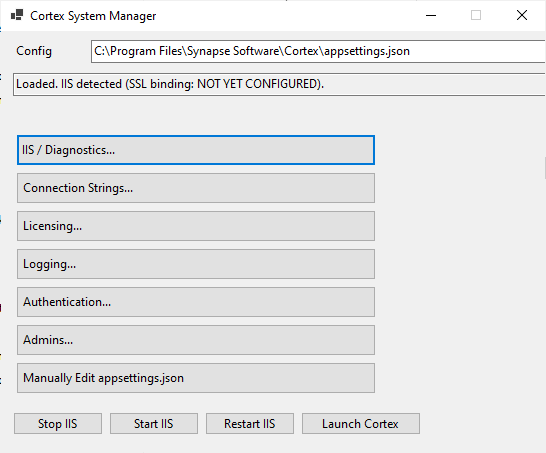
Check that the LookUp By field is set to match what your IdP sends. In most SAML deployments this should be Email.

Save and restart Cortex, then have the affected user log in again.
For more detail on how this setting works, see User Identity Matching.
Fix 2 - Manually grant admin access
If the user needs immediate access, or if Fix 1 does not resolve the issue, you can forcibly grant admin status using the Cortex System Manager.
The user must have logged into Cortex at least once before this will work - their account needs to exist in the system.
Full instructions: Granting Cortex Admin Access
- Open the Cortex System Manager and click Admins....
- Click Load Admins to see the current list of admin users.
- Enter the user's username or email address in the field provided.
- Click Make Admin.

The user will have admin access on their next login.
Internal Auth - Redirected Back to Login Page
Symptoms
When attempting to sign in using Internal authentication, the user is successfully redirected after login but immediately returned to the Log In page.
Likely Cause
This behavior is commonly caused by a corrupted, expired, or blocked authentication cookie in the browser.
How to Check
- Open the site in a Private / Incognito browser window.
- Attempt to log in again using Internal authentication.
- If login succeeds in private mode, the issue is almost certainly cookie-related.
Resolution
- Clear cookies for the affected site:
- Close all browser windows.
- Reopen the browser and attempt login again.
If the issue persists after clearing cookies and verifying in private mode, contact Support for further investigation.
SAML login fails after renaming the server
SAML login fails after renaming the Cortex server
Symptoms
The Cortex server was renamed (for example, to match a production naming standard). Afterward, SAML login fails, redirects to an error page, or the identity provider reports that it does not recognize the request.
The application itself may still load fine at the new address - the problem shows up specifically during SAML authentication.
Cause
Renaming the server does not update Cortex's SAML configuration. Two separate places still reference the old address:
- Cortex's own Public URI setting, configured in Cortex System Manager.
- The identity provider's relying party / SP configuration (ADFS, Azure AD, Okta, or Google Workspace), which still expects requests from and redirects to the old address.
Until both are updated to the new address, SAML will fail - either because Cortex is still asserting the old URI, or because the identity provider rejects a request coming from an address it doesn't recognize.
Fix
- Open Cortex System Manager (desktop shortcut, or
Cortex.Config.exein the installation directory) and click Authentication....
- Update the Public URI field to the new address.
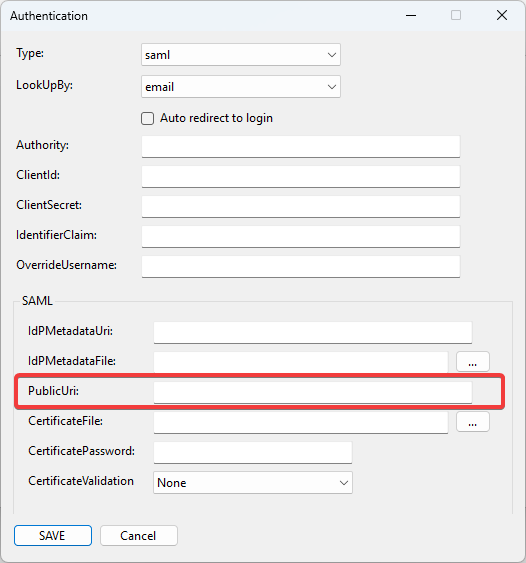
- Save and restart Cortex.
- Update the relying party / SP configuration on your identity provider to match the new address. See the relevant guide:
Full walkthrough: Renaming a Cortex Server